
·
Manus alternative: a desktop AI agent that asks before it sends
Looking for a Manus alternative? HanFlow Bot is a Windows and Mac AI agent that runs on your Claude or GPT subscription and asks before it sends.

Looking for a Manus alternative? HanFlow Bot is a Windows and Mac AI agent that runs on your own Claude or GPT subscription and waits for your approval before anything is sent, submitted or paid.
Updated 14 November 2026. Manus details below are what manus.im/pricing showed that day.
Both tools hand work to an agent. They differ in three places that decide which one fits you: where the work runs, what a task costs you, and what the agent is allowed to finish on its own.
What Manus offers today
Manus is a cloud agent that runs on credits, with web, desktop and mobile apps listed on its own site.
| Manus plan | Credits | Also listed on the plan |
|---|---|---|
| Free | 300 credits per day | Manus 2.0 Lite · 3 tasks at once · 2 automations |
| Pro | 4,000 credits per month | Manus 2.0 and 2.0 Max · custom domain · Wide Research · advanced image and video · Manus Flex (bring your own key) · 20 tasks at once · 20 automations |
| Max | 40,000 credits per month | usage-based billing once credits run out · early access to beta features · priority support |
Its site also lists team licences, SSO and an API on the business pages, and a product line that covers AI design, AI slides, an AI image generator, an AI music generator, video, Wide Research and a Slack integration, plus mobile app, desktop app and "My Browser" downloads. Manus's own help pages describe the desktop app as able to use your local machine for some execution while planning and agent decisions stay in the Manus cloud.
If you want slide, design, image, music and video generation inside one cloud subscription, that breadth is Manus's strength. Plan names and credit amounts change, so check the pricing page yourself before you buy — we did not copy prices here because the page renders them as animated digits.
What HanFlow Bot does differently

You bring your own AI subscription. HanFlow Bot connects through a Claude subscription (Claude Code) or a GPT subscription (Codex) — you pick one. There is no credit pool to top up. API keys are not accepted, and hanflowai.com credits are never used; only AI image generation needs a separate image API key. The Claude or GPT subscription is yours and is not included in the HanFlow Bot price.
Nothing is sent, submitted or paid until you approve it. That is how the site describes the split: you log in once at the start, and the final approval for sending, submitting, paying and transfers is yours. The bot opens the site, searches, fills forms, attaches files and drafts replies in your tone — then shows you the filled screen and waits.
It never types your password. Passwords, one-time codes and identity checks are yours. If a site has logged you out, the bot stops and tells you, you sign in, and it carries on.
It works in a browser window on your PC. The bot fills forms and works in portals — the sites you already use — in a window you can watch.
Your files stay on your PC. Documents and files the bot creates are saved locally. (Your request and the material it needs still go to Claude or GPT to be processed — that is what your AI subscription is for.)
Your phone is a remote control. While HanFlow Bot is running on your PC, the phone app or any browser can talk to it through Use from any device — you chat with it and receive files, and the work still happens on your PC.
One subscription. The Base subscription covers HanFlow Bot and HanFlow Basic Manager (pricing); at checkout the product name shown is "HanFlow AI Assistant — Base (Monthly)". HanFlow Bot itself installs on Windows and on Apple Silicon Macs. The HanFlow All-in-One Manager — work, project management, expense evidence and trade documents, five managers in one window — has a Windows installer you put over the top: same folder, and your conversations and memory stay. On a Mac there is a separate HanFlow Basic Manager download.
Side by side
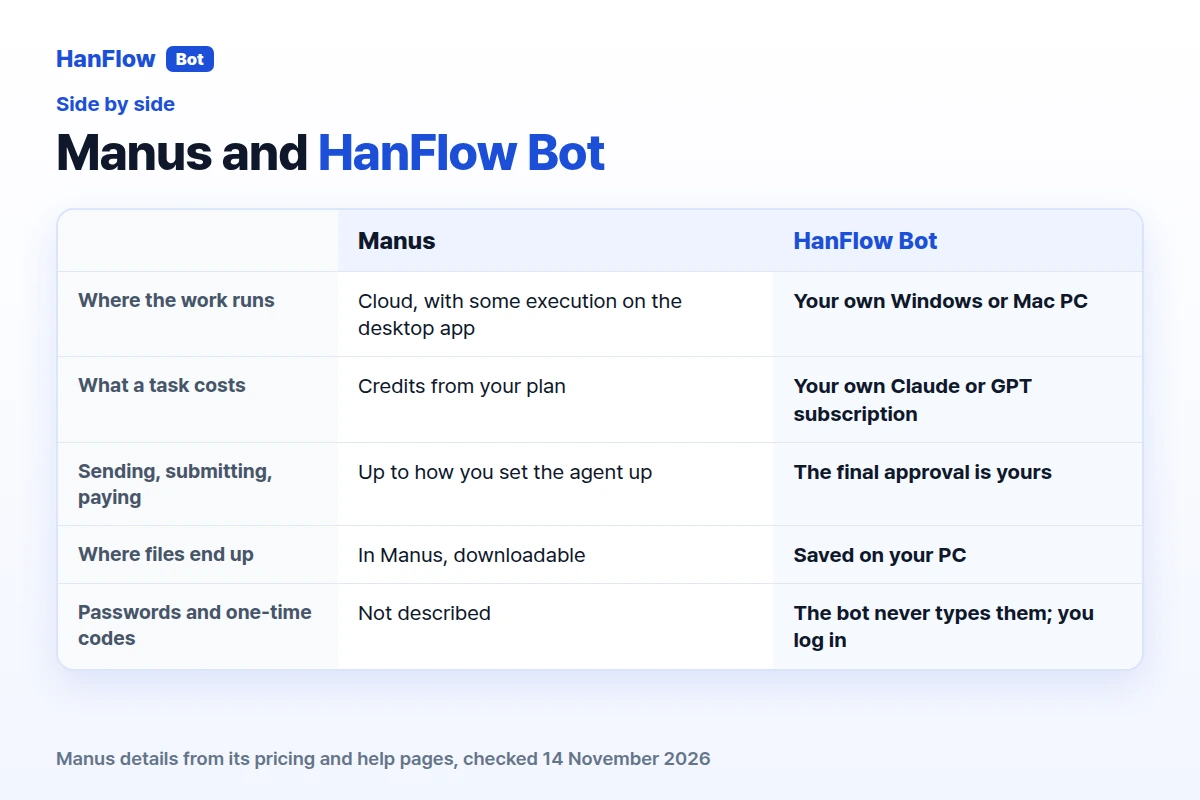
| Manus | HanFlow Bot | |
|---|---|---|
| Where the work runs | Cloud, with the desktop app able to use your local machine for some execution | On your own Windows or Mac PC, through your Claude or GPT subscription |
| What a task costs | Credits from your plan; Max bills by usage once credits run out | Your own Claude or GPT subscription; no credit pool |
| Bring your own model key | Manus Flex, listed on Pro | Required: Claude Code or Codex subscription; API keys not accepted |
| Sending, submitting, paying | Up to how you set the agent up | Final approval is always yours |
| Passwords and one-time codes | — | The bot never types them; you log in |
| Where files end up | In Manus, downloadable | Saved on your PC |
| Breadth | Design, slides, image, music, video, Wide Research, Slack | Writing, images, document files, calendar, email drafts, code, web form and portal work, voice input |
| Phone | Mobile app listed on the site | Phone or any browser talks to the bot running on your PC |
Two tasks, step by step

A reply to a supplier. You forward a quote and say "answer this, keep my tone, and ask for a two-week lead time." The bot reads the thread and drafts the reply in your tone. Nothing is sent to the supplier until you approve it; if you change two sentences first, it sends what you approved.
A grant portal form. You give the bot last year's report and say "fill in this year's submission." It opens the portal in a browser window on your PC — you signed in yourself — copies the figures across and attaches the file, then shows you the filled screen. You give the final approval, and the result is saved on your PC.
In both cases the agent does the typing and the looking-up, and the irreversible step stays with you.
Which one should you pick?
Pick Manus if you want design, slides, image, music and video generation inside one cloud subscription and you are happy to manage a credit balance.
Pick HanFlow Bot if you already pay for Claude or GPT and would rather use that than buy credits, you work in portals and webmail behind your own logins, and you want the final approval for sending, submitting and paying to stay with you.
More comparisons: AI agent alternatives · OpenClaw alternative · Microsoft Copilot alternative · ChatGPT agent alternative
HanFlow Bot is made by Quantum Materials Inc. (Republic of Korea). Korean version: Manus alternative (Korean)
Frequently asked questions
Do I need a Claude or GPT subscription?
Yes. HanFlow Bot needs a Claude subscription (Claude Code) or a GPT subscription (Codex). API keys are not accepted and that subscription is not included in the price. Only AI image generation needs a separate image API key.
Is this a different subscription from HanFlow AI?
No. Both use the same Base subscription; at checkout you will see "HanFlow AI Assistant — Base (Monthly)".
Can I use it from my phone?
Yes, while HanFlow Bot is running on your PC. Install HanFlow Bot on the PC first, then use the phone app or any browser.
Where do the files go?
They are saved on your PC.
Does the bot ever send something by itself?
Sending, submitting, paying and transfers wait for your approval — that is how the product is built.
What if I want the other managers later?
On Windows, install the all-in-one installer over HanFlow Bot: same folder, conversations and memory kept. On a Mac, there is a separate HanFlow Basic Manager download — HanFlow Bot itself has its own Mac version for Apple Silicon.